Pavel
Vakhlamov
HW2
1. Open a blank map in ArcMap
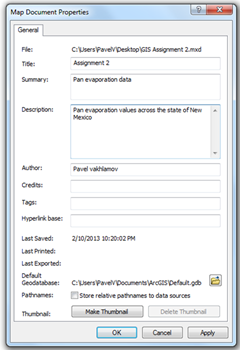
2. Go in to File > Map Document
Properties and add information such as title, summery, description and author.
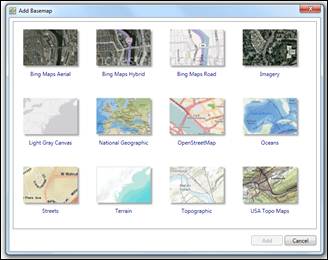
3. Insert background map from Add data
> Add basemap.
4. Insert USA boundary layer
Add data > USA > States
5. Add pan evaporation layer provided in
FTP class directory by going to Add data nad
navigating to the user specified folder containing the layer.
6.
a. Change symbol to water droplet.
Double click on the
symbol to display symbol selector menu. In the search bar type in water drop. Select
the appropriate symbol.
b. Make symbols proportional to “ANNUAL”
value.
Right click on layer >
Layer properties > Symbology >Show:
“Classified”. In “Fields” select “ANNUAL”.
c. Add labels to the locations.
Layer properties >
Labels, activate label features in this layer checkbox and select “NAME” in the
Label Field dropdown menu.

7. In View select display as graph and add
appropriate data. Import graph in to layout.
8. In the layout view add a North arrow,
legend and scale bar.
9. Export the map.